
Getting started
Create your first campaign
Connect a traffic source, an offer and a campaign with a controlled test destination.
Prepare the resources
Use a destination you control or have permission to test. Add a traffic source and an offer first. Add a lander if your funnel needs one.
Create the campaign
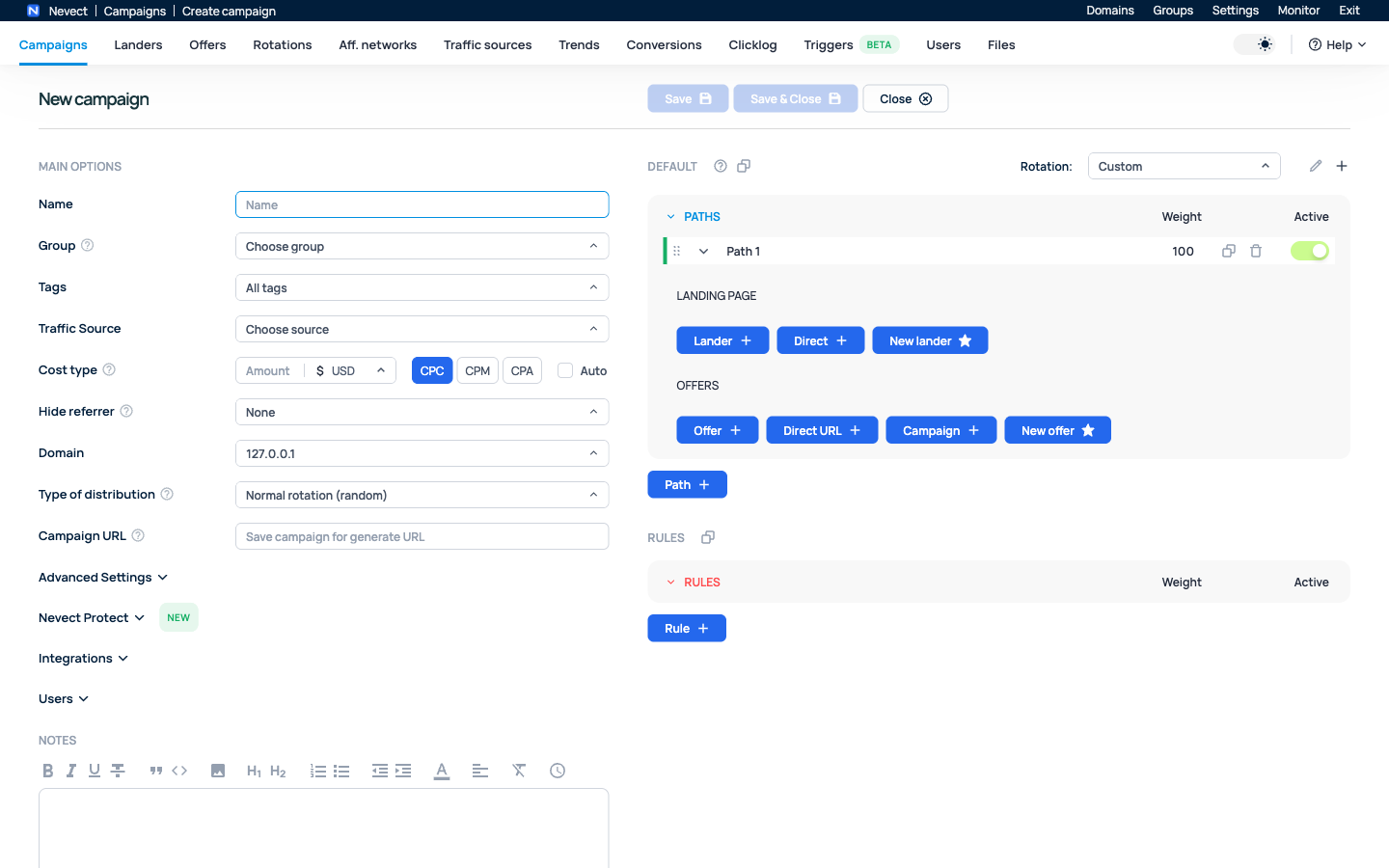
- Open Campaigns → Create.
- Enter a recognizable name and choose a group or tags if useful.
- Select the traffic source. Its configured tokens determine which source values enter your tracking URL.
- Choose the tracking domain and cost model. Leave automatic cost disabled until the incoming cost macro has been tested.
- In traffic distribution, add a path. Choose Direct for a direct-to-offer test, then select the offer. For a landing-page funnel, select a lander and its offer.
- Keep a simple distribution while testing: one path, one destination, no additional conditions.
- Save and copy the generated Campaign URL.
Understand the identifiers
| Identifier | Purpose |
|---|---|
| Campaign key | Selects the campaign |
| External click ID | Identifies the visit in the traffic source |
| Tracker click ID | Associates the visit, offer and conversion inside Nevect |
| Token | Carries an extra source value such as placement or creative |
Do not interchange the traffic source's external ID and Nevect's click ID. An offer normally passes the tracker click ID to the network; outgoing source postbacks return the external ID.
Confirm the result
Open one controlled campaign visit and find it in Clicklog. Inspect the destination and query parameters. Continue with click and conversion verification before starting paid traffic.
A minimal direct-to-offer example
Use this worksheet for an isolated campaign before adding more paths or rules. The labels are examples; they are not pre-created resources.
| Editor field | Example choice | Why |
|---|---|---|
| Name | Verification / direct |
Easy to identify in Clicklog and reports |
| Traffic Source | Your configured test source | Defines the incoming external ID and source tokens |
| Cost type | CPC with a known test amount; Auto off | Makes the first cost check predictable |
| Domain | Your working tracking domain | Makes the generated URL reachable |
| Type of distribution | Normal rotation | Keeps the initial route simple |
| Landing page | Direct | Skips a lander in this first test |
| Offers | One authorized test offer | Makes the expected destination unambiguous |
For an offer using sub1, the saved offer URL can include sub1={clickid}. Use the partner’s actual accepted field. After saving the campaign, its Campaign URL should be generated. Copy that URL instead of constructing a campaign key manually.
Make the result observable
Open one controlled visit, then compare the recorded external ID, source tokens, selected offer and cost in Clicklog. Inspect the final destination to confirm the offer received a resolved Nevect click ID. Record the click ID for the conversion test.
If no URL is generated, check required fields and save errors. If the wrong page opens, inspect the active path, rules and destination URL. If a macro remains literal, use the token mapping guide before adding more resources.