
Paths & rules
Paths and weighted distribution
Build a campaign's destination paths and verify their effective traffic share.
What a path contains
A path combines a lander choice and one or more offers. A direct path skips the lander. Several paths let one campaign compare funnels or route different traffic segments.
Configure the path
- Edit a campaign and open its traffic distribution section.
- Add a path and select Direct or the intended lander.
- Add the offer or offers that belong to that path.
- Set path, lander and offer weights at their respective levels.
- Save, then verify a controlled visit.
Interpret weights
A weight is relative to the other eligible items in the same selection. For example, two eligible paths weighted 1 and 3 express a 1:3 split in normal rotation. This is not a guarantee for every small group of visits.
Rules, uniqueness, caps and the selected rotation mode can change which items are eligible. A path weight does not override a rule that chooses a different route.
Other destination types
The path editor also offers Direct URL and Campaign destinations. Use Direct URL for an explicitly entered destination and Campaign to select an existing campaign. Review whether that choice uses the offer settings you expect. Do not create a route that leads back into itself; verify every hop and the resulting click context before using a chained campaign.
Fallback checks
Check that a destination remains available when a condition does not match or an offer reaches its cap. Test both the matching and non-matching cases.
Investigate unexpected routing
Inspect the actual click's path, rule and destination. Compare them with the saved campaign, shared rotation and advanced distribution mode. Do not judge a weighted split from a handful of browser reloads; reloads may share the same visitor context.
Start with two eligible paths
For a controlled comparison, create two active paths with known authorized destinations. With weights 1 and 3, the intended relative share is 25% and 75% while both remain eligible under the selected distribution mode. These percentages describe the configured relationship, not a guarantee for every four clicks.
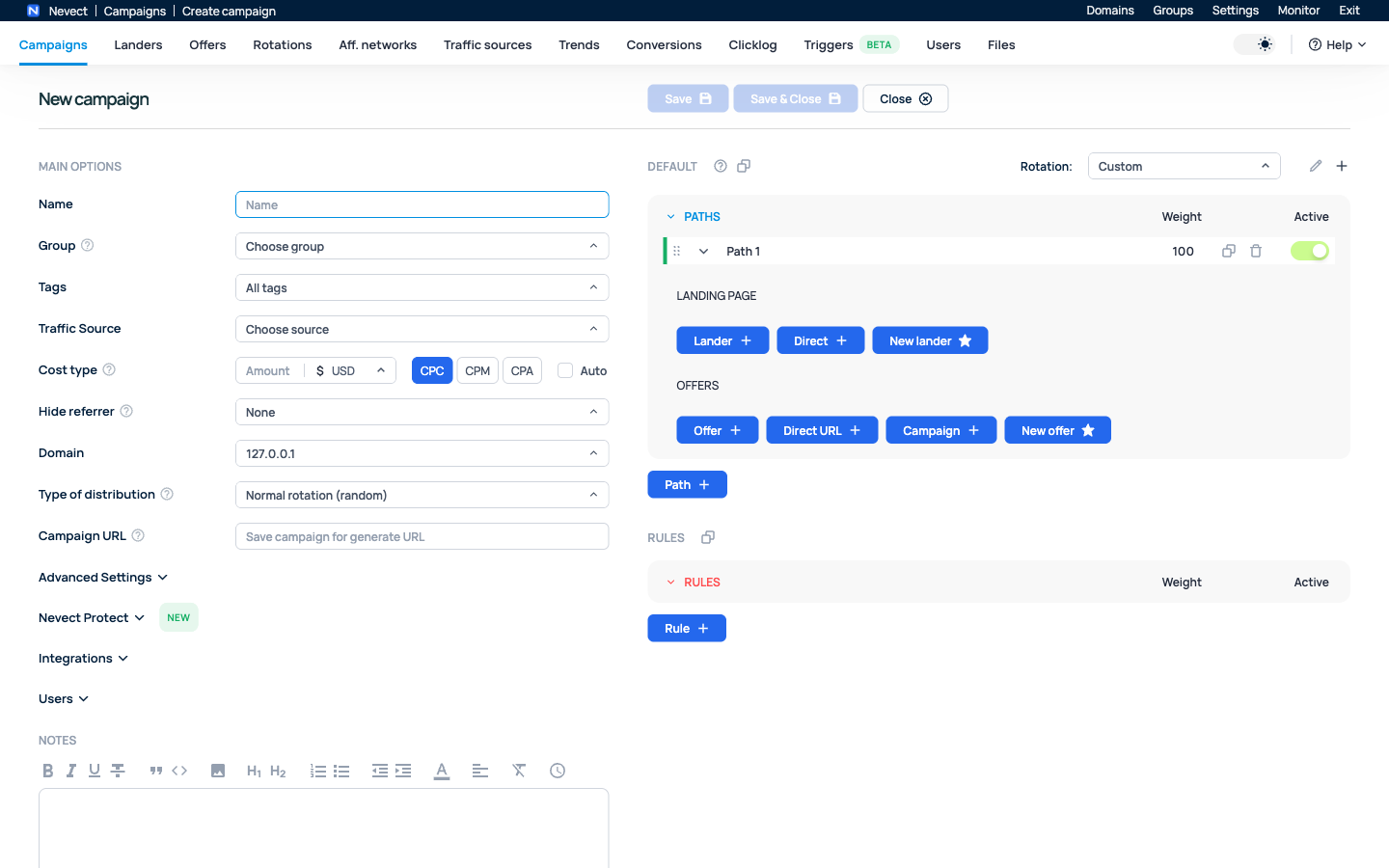
Check the Active switch and the weight at each relevant level. A path’s weight selects among paths; an offer’s weight selects among eligible offers inside its path. Changing one does not automatically set the other.
Verify rules and fallback separately
Write down two test cases before sending traffic: one that matches the intended rule and one that does not. For each controlled visit, inspect Clicklog for the selected path, offer and destination. Also test what remains eligible after a cap or disabled destination removes an item.
If both tests reach the same destination, check rule conditions and the selected distribution mode before repeatedly changing weights. If routing crosses into another campaign, trace each hop and confirm that you have not created a loop.
Use campaign reports to evaluate the resulting traffic in a consistent scope. Record routing changes and their times so you can distinguish configuration changes from performance differences.